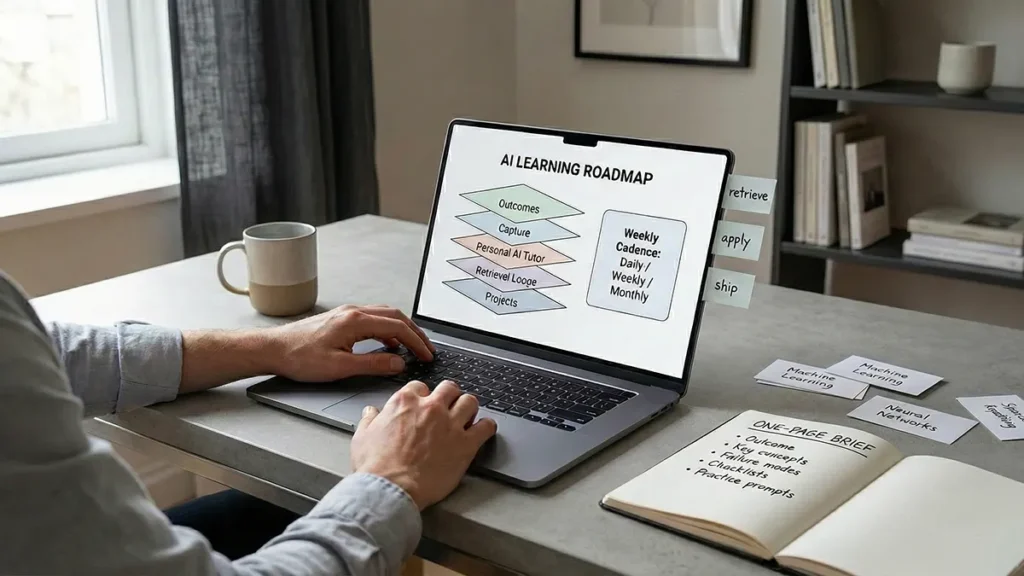
Most professionals don’t have a learning problem. They have a learning system problem. The internet is endless, workdays are fragmented, and every new tool promises to make you “smarter” while quietly multiplying your tabs, your notes, and your anxiety.
This is where an AI learning roadmap becomes more than motivation. It becomes infrastructure: a repeatable way to decide what to learn, capture what matters, convert it into usable memory, and ship outcomes—without turning your evenings into a second job.
Done right, that infrastructure looks practical: a personal AI tutor for sensemaking, an AI note-taking system that turns highlights into decisions, an AI study workflow that survives busy weeks, and spaced repetition with AI to make knowledge stick.
But there’s a catch. If you let AI do the thinking for you, you will feel productive and learn less. If you use AI to structure practice with you, you’ll learn faster, retain longer, and build compounding career leverage. This guide shows you how.
Table of Contents
- The Learning Crisis Nobody Names
- AI Learning Roadmap: The 5-Layer Stack
- Build a Personal AI Tutor That Doesn’t Make You Lazy
- Design an AI Note-Taking System You’ll Actually Use
- Your AI Study Workflow: A Weekly Cadence That Fits Real Life
- Use Spaced Repetition With AI Without Turning It Into Homework
- The Risk Side: Privacy, Hallucinations, and Over-Reliance
- A 30-Day Implementation Plan (That Doesn’t Collapse in Week Two)
- What This Roadmap Changes (And Why It Feels Like a Breakthrough)
The Learning Crisis Nobody Names
Professional learning used to be linear: read a book, take a course, apply it at work. Now it’s a stream: newsletters, research drops, product updates, best-practice threads, and new models shipping weekly. The modern bottleneck isn’t access. It’s selection, synthesis, and recall.
That’s why many high performers feel like they’re “keeping up” but not getting ahead. They consume information, but they don’t convert it into decisions, outputs, or durable skill. If your knowledge evaporates under pressure, your system is missing retrieval, repetition, and application.
If you want the bigger context behind this shift, AI Learning Revolution: How Machines Are Reshaping Knowledge shows how learning is becoming an interactive layer—less like “taking a course,” more like building a dialogue with tools.
AI can help—if you design it to reduce friction without removing effort. Learning still requires cognitive work. The trick is to spend that work in the right places.
AI Learning Roadmap: The 5-Layer Stack
Think of an AI learning roadmap as a stack. Each layer solves a different failure mode: unclear goals, messy inputs, shallow understanding, weak recall, and zero application.
Layer 1: Outcomes, Not Topics
Start with outcomes you can ship in 30–90 days. “Learn AI” is a mood. “Automate weekly reporting with an AI-assisted workflow” is an outcome. Outcomes create boundaries. Boundaries create speed.
- Work output: a dashboard, a proposal, a content series, a prototype.
- Skill output: a reusable template, a checklist, a decision rubric.
- Career output: a portfolio piece, a talk, a measurable project win.
If you’re aligning learning to leadership goals, it helps to think like strategy—not study. The Transformative Role of AI in Modern Business Strategy is a good companion piece for turning “what should we learn?” into “what should we build next?”
Write one sentence: “In 30 days, I will produce ______ that proves I learned ______.” This sentence becomes the anchor for your personal AI tutor and your AI study workflow.
Layer 2: High-Signal Capture (Without Hoarding)
Capture is where professionals self-sabotage. They clip everything and process nothing. Your capture rule should be simple: only save what you plan to revisit.
Use a two-bucket intake:
- Now: sources tied to your current outcome (keep 5–12 max).
- Later: everything else (a single backlog list, not a folder maze).
AI helps here by summarizing long sources into “decision notes”: what matters, what’s actionable, and what’s worth testing. But the real win is what happens next: your AI note-taking system should turn those notes into checklists, practice prompts, and project steps.
Even the best systems have limits—AI Tools Limitations: What They Still Can’t Do is the clearest map of where your workflow still needs human judgment.
Layer 3: Sensemaking With a Personal AI Tutor
A personal AI tutor is not a chatbot you ask random questions. It’s a guided routine that forces clarity. Your tutor should do four jobs:
- Interrogate: ask you to explain concepts in your own words.
- Contrast: show trade-offs, alternatives, and failure cases.
- Contextualize: map ideas to your job, your industry, your constraints.
- Test: generate practice questions and scenarios that expose gaps.
The goal is not “answers.” The goal is better thinking. If your personal AI tutor makes you feel smart instantly, it’s probably doing too much. If it makes you notice what you don’t know, it’s doing its job.
Layer 4: Retrieval Loops (Where Learning Becomes Real)
Most people reread and rewatch because it feels safe. But durable learning requires retrieval—trying to recall without looking. Decades of research on the “testing effect” shows retrieval practice can significantly improve long-term retention compared to rereading alone.
For a quick primary reference, see Roediger & Karpicke’s classic paper on testing memory: The Power of Testing Memory.
This is the perfect place for spaced repetition with AI. Not because AI “teaches” you, but because it helps you generate, schedule, and vary retrieval prompts—especially when your AI study workflow is time-boxed.
Layer 5: Projects and Outputs (The Anti-Forgetting Layer)
Knowledge that never touches the real world decays. Your learning system must end in a project. Build a template. Write a memo. Teach a colleague. Publish a playbook. Ship something that forces you to use the skill under real constraints.
This also connects learning to productivity. If your sprint is designed to improve execution, pair this with AI Automation Is Quietly Rewriting Productivity—because the best outcomes usually come from reducing workflow friction, not adding more “study time.”
If your output is creative (writing, media, strategy decks), it helps to frame AI as a collaborator rather than a replacement—see Machine-Assisted Creativity: How AI Expands Human Imagination and AI Impact on Creativity: Powerful Shifts in Media and Culture.
Build a Personal AI Tutor That Doesn’t Make You Lazy
The best personal AI tutor has guardrails. It prevents hallucination-driven confidence and reduces dependency by forcing you to do the core cognitive work: explaining, deciding, and recalling.
The “Tutor Contract” Prompt
Use this once per learning sprint (then reuse):
You are my personal AI tutor. Your job is to help me learn by asking questions, checking my reasoning, and generating practice. Do not write long lectures unless I ask. If you are unsure, say so. When you answer, include: (1) a short explanation, (2) a counterexample, (3) a quick test question, (4) a practical application for my work.
This makes the tutor interactive and retrieval-focused, not a content firehose.
Three Tutor Modes You’ll Actually Use
- Explainer mode: “Explain this in 120 words, then ask me to restate it.”
- Coach mode: “Give me a 10-minute drill and keep me honest.”
- Reviewer mode: “Quiz me with increasing difficulty and track weak spots.”
Keep sessions short. Ten minutes daily beats two hours monthly because it compounds memory through repeated retrieval.
Design an AI Note-Taking System You’ll Actually Use
An AI note-taking system fails when it becomes a museum: beautiful, organized, unused. Your system should behave like a workshop. Notes must transform into actions, prompts, and practice.
Four Note Types (No More)
- Source note: what the author said (with link and context).
- Concept note: your explanation in plain language.
- Decision note: what you will do differently at work.
- Practice note: questions, flashcards, scenarios for retrieval.
AI accelerates the boring parts: turning highlights into draft concept notes, generating practice questions, and converting decisions into checklists. But you should still rewrite the concept note yourself—this is where understanding forms.
If your workflow feels “heavy,” it’s often cognitive overload, not motivation. How AI Reduces Cognitive Load at Work explains why structure beats intensity when your day is fragmented—and why a cleaner AI note-taking system often solves more than “more discipline.”
The “One-Page Brief” Rule
For every learning sprint, create a one-page brief in your notes:
- Outcome (what you will ship)
- Key concepts (5–9 max)
- Common failure modes
- Checklists you’ll use
- Practice prompts
This brief becomes your command center. Your personal AI tutor reads it. Your spaced repetition with AI drills come from it. Your project references it. That’s how notes stop being passive storage and become active leverage.
Your AI Study Workflow: A Weekly Cadence That Fits Real Life
An AI study workflow must tolerate chaos: meetings, deadlines, travel, low-energy days. Design for the minimum viable routine, then scale up when you can.
Daily (10–20 minutes)
- 3 minutes: review yesterday’s concept note
- 7 minutes: retrieval quiz with your personal AI tutor
- 5 minutes: add or refine one practice note
Small, consistent retrieval is the compounding engine—and it’s the part most AI study workflows skip.
Weekly (45–90 minutes)
- Audit: what did I actually learn that changed behavior?
- Refactor: simplify notes, delete dead weight, tighten checklists
- Advance: add one harder scenario or real-world constraint
Ask your tutor to generate “edge cases” based on your job context: unusual customers, risky compliance scenarios, broken data, or ambiguous requirements. This is where shallow knowledge becomes professional judgment.
Monthly (2–4 hours)
Ship an artifact: a mini-project, a write-up, a short internal training, or a public post. Outputs prevent the “I studied a lot” illusion. They also build credibility—your learning becomes visible.
Use Spaced Repetition With AI Without Turning It Into Homework
Traditional spaced repetition fails professionals because it feels like school. The trick is to make it practical and variable: mix definitions with scenarios, decisions, and explanations.
Three Card Types for Professionals
- Explain: “Explain concept X in 60 seconds.”
- Decide: “Given scenario Y, what would you do and why?”
- Debug: “Here’s a flawed approach—spot the issue.”
Spaced repetition with AI makes this scalable. You can paste your one-page brief and ask your personal AI tutor to generate 20 cards across these types, then you select the best 10. Selection is important: it keeps you in control of signal quality.
When you review, don’t just mark “right/wrong.” Add one sentence: “What tricked me?” That sentence becomes the next week’s learning accelerator.
The Risk Side: Privacy, Hallucinations, and Over-Reliance
Learning with AI is not risk-free. In many organizations, it’s also a compliance conversation. Your roadmap should include safe defaults.
Privacy: Don’t Feed the Tutor Sensitive Data
Use anonymized examples. Remove client identifiers. Avoid proprietary documents unless you have an approved environment. As rules and expectations harden, AI Regulation Is Reshaping the Global Tech Landscape is the best overview of why “good intentions” aren’t enough anymore.
And if your tutor starts acting more like an agent—touching real systems, triggering actions, or handling tickets—borrow the guardrails from AI Agent Governance: 9 Proven Rules for Safe Scale.
Hallucinations: Treat AI as a Drafting Partner
AI is best at synthesis and suggestion, not authority. Build a habit: if a claim affects money, safety, or reputation, verify it using primary sources. For technical topics, ask the tutor to provide multiple interpretations and flag uncertainty explicitly.
Over-Reliance: Keep “Hard Thinking” in the Loop
If AI always explains first, your brain stops practicing. Flip the flow:
- You explain first.
- The tutor critiques and corrects.
- The tutor quizzes you with a new scenario.
This pattern preserves effort while reducing friction—exactly what a professional-grade learning system should do.
A 30-Day Implementation Plan (That Doesn’t Collapse in Week Two)
Most learning plans fail because they start too big. Here’s a realistic rollout that builds momentum.
Days 1–3: Define the Sprint
- Choose one outcome.
- Create your one-page brief.
- Set up your capture buckets (Now/Later).
Days 4–10: Build the Tutor Routine
- Use the tutor contract prompt.
- Run a 10-minute daily drill with your personal AI tutor.
- Create 10 practice notes total.
Days 11–20: Add Retrieval and Spacing
- Generate 20 candidate cards, keep the best 10.
- Review 5 minutes/day using spaced repetition with AI.
- Upgrade cards from “definitions” to “decisions.”
Days 21–30: Ship an Output
- Build a template, memo, or mini-project.
- Teach it to someone (even asynchronously).
- Refine your one-page brief into a reusable playbook.
At the end of 30 days, your AI study workflow should feel lighter—not heavier. If it feels heavier, cut tools, reduce sources, and double down on retrieval practice over consumption.
What This Roadmap Changes (And Why It Feels Like a Breakthrough)
The hidden promise of an AI-enabled learning system is not speed. It’s confidence under uncertainty. When you can retrieve what you know, explain it simply, and apply it in messy real situations, you stop feeling like knowledge is fragile.
You also stop chasing novelty. You become selective. You learn in sprints. You ship artifacts. You build compounding skill. That’s the real advantage of an AI learning roadmap: it turns information into outcomes—reliably.
And once the system exists, you can reuse it for anything: a new domain, a new role, a new toolset, a new market shift. In a world where infrastructure constraints increasingly shape what AI can do at scale, keep an eye on AI Trends Expose a New Battle for Computing Power.
Your learning becomes a professional superpower, not a constant stressor.